
An assistant becomes more useful when it can work with the right information and produce something you can use. A project brief can draw on approved notes. A support assistant can retrieve the relevant runbook. A document workflow can turn a file into fields that another application understands.
The useful question is what each added component contributes. A package name alone tells you little about its access, instructions, or actions.
On this page

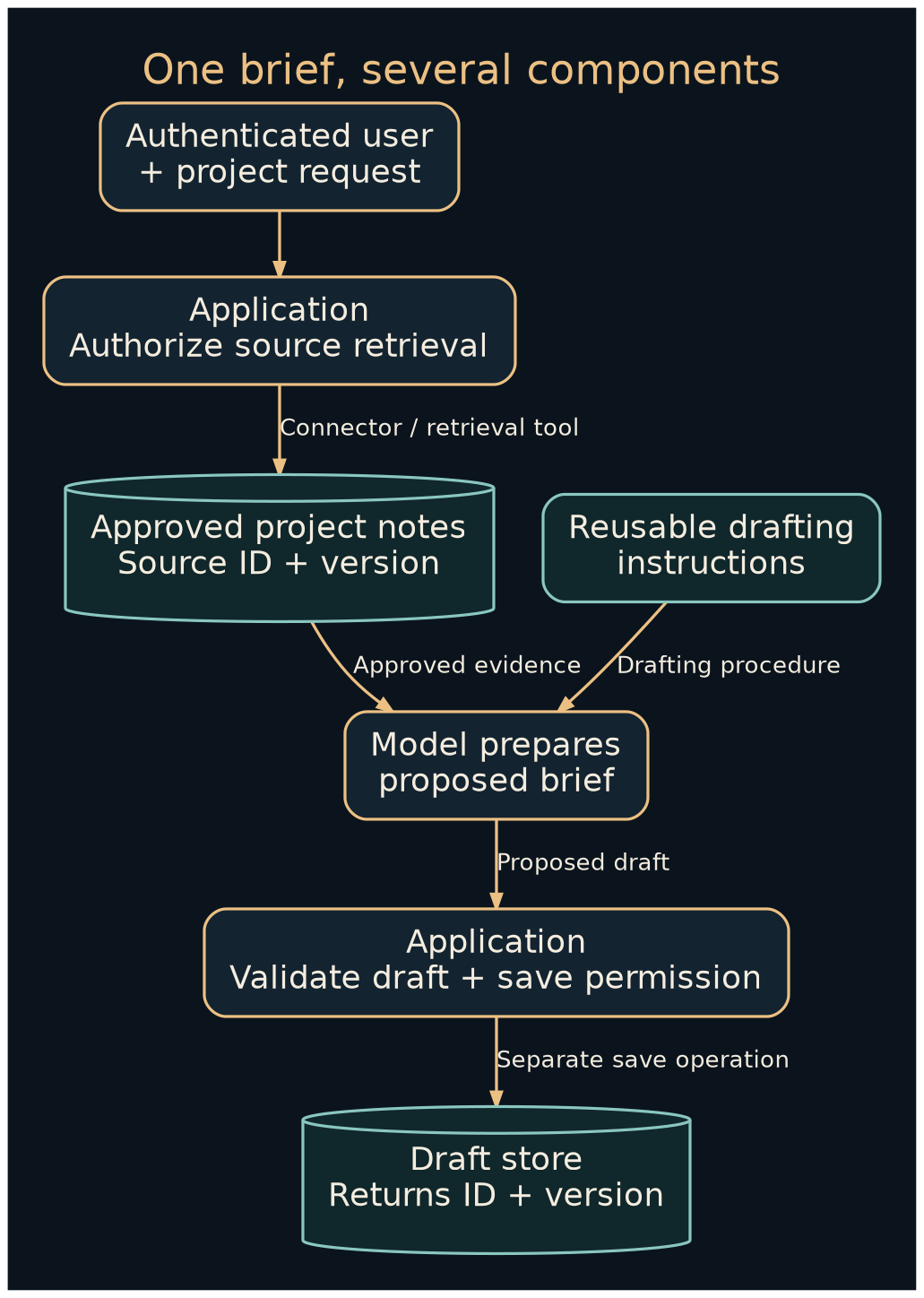
Follow one job through the layers
Imagine a fictional design studio preparing a client project brief. It wants a draft assembled from approved project notes, with missing decisions clearly marked. It needs several distinct capabilities:
| Piece | Its job in this example | What to inspect |
|---|---|---|
| Model | Interpret the notes and propose the brief | Whether the output preserves facts and uncertainty |
| Skill or reusable instructions | Define the studio’s drafting method | Trigger, procedure, examples, resources, and maintenance |
| Connector | Provide a supported route to the notes application | Account, source scope, read/write operations, and data handling |
| Tool | Perform a named operation, such as fetching a project | Arguments, authorization, returned evidence, and errors |
| Plugin or extension | Package capabilities for an application | Publisher, bundled components, updates, and requested access |
| Workflow | Organize retrieval, drafting, checking, and saving | Triggers, conditions, review points, and failure paths |
| Application | Enforce identity and execute permitted operations | Validation, secrets, logs, and recovery |
Names differ between products. Inspect the installed component and the current documentation. A platform may call a connection an app, an integration, or an extension.
Anthropic’s Skills documentation describes one concrete approach: a package containing instructions and metadata, with optional scripts and supporting resources. That format illustrates how a reusable procedure can travel with its working materials. Adoption and execution support still depend on the host application.
Build a reusable project-brief skill
Start with a procedure you could hand to a colleague. Give it a narrow purpose and a clear deliverable. This example is a platform-neutral instruction template; adapt packaging to the host’s documented format.
Name: Project brief preparation
Use when: A team member requests a draft from approved project notes.
Inputs: Project ID, current notes, source version, requested deliverables.
Procedure:
1. Record the project ID and source version.
2. Extract objectives, deliverables, dates, owners, and open decisions.
3. Preserve explicit facts; mark absent information as unknown.
4. Build the brief using those fields and cite the source sections.
5. List conflicts and questions for the project owner.
Output: Draft brief plus a source and open-questions table.
Completion: A reviewable draft exists; delivery to a client is separate.
For a first attempt, paste fictional notes into an assistant and use these instructions. You can learn whether the procedure works before connecting anything.
Then add a sample input: “Project P-104: create three landing-page concepts. Owner: Lena. Review on 12 December. Launch date undecided.” A useful output preserves three concepts, identifies Lena, and leaves the launch date unknown. It should ask which year applies to the review date if the surrounding project context does not establish it.
Connect only the information the job needs
An API is a defined interface through which software requests information or actions. A connector adapts that interface for the application using it. A webhook is an event notification that can start work when something changes. Authentication establishes the caller’s identity; authorization decides which resources and operations that identity may use.
For the studio, a practical sequence is:
- Create a test project containing only fictional notes.
- Choose a connector that can retrieve that project and inspect its operations.
- Establish the account and source boundary in the application.
- Fetch the notes and retain their identifier and version.
- Run the reusable drafting procedure.
- Save the reviewed output through a separately defined operation.
The permission model matters. For example, Microsoft Graph distinguishes delegated access from application access. A background service and an application acting with a signed-in user can have different effective access. Check the actual API and tenant configuration before assuming a connector follows the requester’s permissions.
Keep credentials in the platform’s connection or secret-management mechanism. A prompt should receive the task information it needs, not the secret used to retrieve it.
Give tools a clear contract
A useful retrieval tool returns enough information to judge what happened. Here is an illustrative application contract, not an API copied from a vendor:
{
  "tool": "read_project_notes",
  "arguments": {"project_id": "P-104"},
  "result": {
    "status": "ok",
    "source_id": "notes-P-104",
    "version": 7,
    "text": "Three landing-page concepts. Launch date undecided."
  }
}
The application derives the user’s access from the authenticated session. It checks access to P-104 before returning text. A tool error should state whether the source was unavailable, the request was invalid, or access was denied; it should not disguise all three as an empty document.
Anthropic’s tool-design guidance emphasizes clear tool descriptions and useful returned context. Apply that idea by making the outcome and its evidence explicit.
Where MCP fits
The Model Context Protocol architecture describes a common interface between AI applications and programs exposing capabilities. Its building blocks include tools, resources, and prompts. A host can use those capabilities while retaining responsibility for its own application behavior.
MCP can make integration reusable across compatible hosts. It does not decide which business information a person should see, automatically make every integration portable, or replace the destination service’s authorization. Check the host, server, supported protocol version, transport, and actual operations together.
Keep knowledge, memory, and training distinct
| Mechanism | What changes | Example |
|---|---|---|
| Instructions | The task guidance supplied to the system | The studio’s brief-writing procedure |
| Retrieval | Which source material enters a particular request | Fetching version 7 of project notes |
| Context | Information available during the current model call | Request, instructions, retrieved notes, and tool results |
| Persistent state | Records retained between steps or sessions | A saved draft ID and pending questions |
| Fine-tuning | Model parameters through a training process | A separately evaluated adaptation for a defined task |
Uploading a document to a retrieval collection does not itself demonstrate that a model was trained on it. Data retention and training use are separate product and contractual questions. Read the terms for the particular service and account.
Choose the smallest workable installation
A hosted connector can reduce infrastructure work while adding vendor and subscription dependencies. A local integration offers more control over its runtime and still needs maintenance, updates, access rules, and backups. A hybrid setup can retain source systems locally while using a hosted model; inspect precisely which content crosses that boundary.
Budget for subscriptions, model usage, connector operations, storage, and the time spent correcting outputs. Test missing notes, a revoked account, a conflicting date, and a request for an unauthorized project. The draft should expose the problem and stop the affected step.
Next, turn this component map into a repeatable workflow, or follow the approved-knowledge build.