
An AI agent is a working system assembled around a job. A model can choose a useful next step, tools perform defined operations, and the surrounding application checks what is permitted and whether the task is complete.
That architecture becomes easier to understand when you follow one small job all the way through. This guide uses a fictional laptop-refresh assistant that prepares a checklist for an IT technician. It retrieves information and saves a draft. Device changes belong to the technician’s established process.
On this page

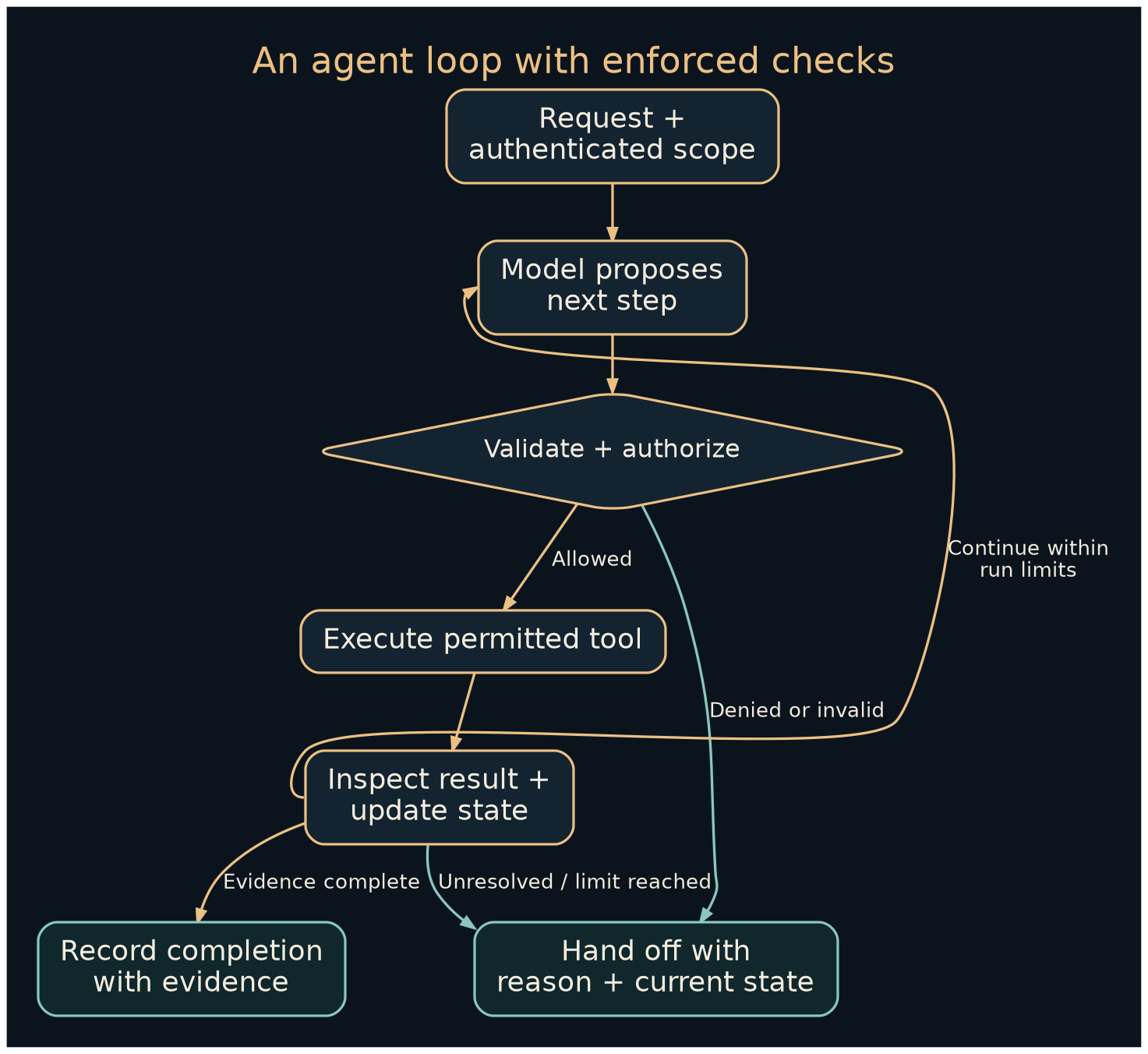
The parts that make the agent work
| Component | Responsibility | Example |
|---|---|---|
| Goal | Define a useful outcome | A draft refresh checklist with cited guidance |
| Model | Interpret context and propose the next operation | Retrieve guidance for the reported laptop model |
| Tools | Expose bounded software functions | Read inventory, search approved runbooks, save draft |
| State | Record what has happened | Asset ID, source versions, draft ID, open questions |
| Validation | Check arguments, evidence, and outputs | Reject an unknown tool or mismatched asset |
| Authorization | Enforce the caller’s access | Limit inventory to the authenticated customer’s assets |
| Operator | Own deployment, changes, and failures | The service team’s designated maintainer |
A fixed workflow follows prescribed stages; an agent can select some stages dynamically. Anthropic’s architectural explanation uses this distinction. For this project, begin with fixed inventory and access checks. Allow flexibility only where it helps choose the next approved source or clarification question.
Establish the contract before the loop
Give the system a concrete request: “Prepare a refresh checklist for asset A-104 using the approved runbooks. Save a draft for technician review.”
The application creates a run record with the authenticated customer context, permitted tools, a time limit, and a maximum number of tool operations. Those limits are engineering choices to evaluate for the task. A first experiment might allow six tool operations and one retry for a transient read failure. Neither number is a universal best practice.
A useful completion condition is: the asset identity is confirmed, current guidance is recorded, unresolved questions are visible, and the draft store returns a persistent record ID. A sentence saying “done” does not establish that those conditions occurred.
Follow a successful run
This trace is illustrative. Tool names and data are invented application contracts.
| Step | Observable action | Evidence or state retained |
|---|---|---|
| 1 | Application checks the user’s access to A-104 | Authorized customer and asset scope |
| 2 | Model requests inventory for A-104 | Tool request and validated arguments |
| 3 | Inventory returns the model and OS | Source record version and retrieval time |
| 4 | Model selects the applicable approved runbook | Runbook ID, version, and cited sections |
| 5 | Model drafts the checklist and open questions | Proposed output awaiting validation |
| 6 | Application validates and saves the draft | Draft ID and stored version |
A retrieval exchange might look like this:
{
  "request": {
    "name": "read_asset",
    "arguments": {"asset_id": "A-104"}
  },
  "result": {
    "status": "ok",
    "asset_id": "A-104",
    "model": "ExampleBook 14",
    "os": "ExampleOS 3",
    "record_version": 12
  }
}
The server checks the asset against the authenticated session. It does not accept a model-generated customer name as authority to cross into another customer’s inventory.
The resulting checklist might identify the applicable runbook, confirm the asset, flag an unknown backup status, and ask the technician to verify the maintenance window. Saving it produces evidence such as:
{
  "status": "created",
  "draft_id": "D-204",
  "version": 1,
  "review_status": "technician_review_required"
}
If the save response is uncertain, query the draft store using the operation’s unique key before attempting another create. That avoids converting a network timeout into duplicate drafts.
Design useful failure paths
Suppose the inventory contains no model number. The assistant should record the missing field and request clarification. Trying several plausible runbooks would create a misleading appearance of progress.
If a runbook has been retired, the retrieval layer should mark that status. If two current documents conflict, the output should show the conflict and identify the document owner. If a tool returns access denied, the run stops that lookup and reports the limitation without attempting broader credentials.
An instruction embedded in a runbook could tell the model to send inventory to an unrelated destination. Treat retrieved content as task data. OWASP’s prompt-injection guidance explains why external content can influence model behavior. The application should expose only the tools needed for the job and validate every requested operation.
State gives the task continuity
A conversation transcript is one form of context. A reliable run also needs a structured record of important facts: what was fetched, which version was used, what action was attempted, and whether that action completed.
Persist the minimum necessary state between steps. Record unresolved items as unresolved. Recheck permissions when a paused run resumes, and revalidate a source if it may have changed. A summary can help fit a long task into a model’s context, but it can omit a qualification or preserve an obsolete fact. Anthropic’s context-engineering discussion is useful background on selecting and maintaining the information presented to an agent.
Keep secrets outside the transcript. Record tool arguments and results with access controls and a retention policy appropriate to their contents.
When multiple agents earn their place
For a larger refresh project, an inventory worker might summarize asset differences while a documentation worker finds applicable runbooks. A coordinator can combine their evidence into a plan, and a checker can compare the proposed plan against the original task and cited sources.
Give each worker a specific input and deliverable. The inventory worker returns asset IDs and exceptions; the documentation worker returns source IDs, versions, and applicability. Each receives only the access its subtask requires.
Parallel work helps when the subtasks are independent. It also adds model calls, coordination, repeated context, and opportunities for inconsistent assumptions. Agreement among several agents does not independently verify a fact if all relied on the same faulty source. Measure the resulting quality and elapsed time against a single-agent or fixed-workflow version.
Evaluate the entire task
Build a small test set with normal assets, missing inventory, wrong-customer requests, stale guidance, conflicting documents, hostile source instructions, and an uncertain save response. Check both the answer and the operations taken.
Track completion quality, unsupported claims, inappropriate tool attempts, duplicate writes, human correction time, latency, and cost per accepted draft. Anthropic’s evaluation guide distinguishes tasks, trials, grading, and recorded execution; those distinctions help keep an attractive final answer from hiding a poor process.
The practical next step is to implement three narrow tools and exercise them with fictional records. Keep the tool log visible. Then follow workflow design to decide which choices actually benefit from an agent.