
A document-processing workflow can turn a pile of files into records people can review and use. The useful output is a set of proposed fields connected to their evidence, with clear handling for missing values and contradictions.
This project uses a fictional invoice. It demonstrates extraction and validation without connecting to accounting software or authorizing a payment.
On this page
Define one document type and one result
Begin with a plain-text sample so the field logic is visible. Add PDFs, scans, and optical character recognition only after the workflow behaves correctly on understandable inputs.
EXAMPLE WORKSHOP SUPPLIES
Invoice: EX-104
Invoice date: 2026-12-04
Currency: USD
3 notebooks at 6.00 each: 18.00
Shipping: 5.00
Total: 23.00
All names, numbers, and amounts are invented. The invoice contains no due date, payment terms, or bank details. Those fields should remain unknown if requested.
Choose a result contract with an invoice identifier, date, currency, line items, totals, source locations, and review status. Store money as decimal strings or integer minor units with a documented currency convention. Avoid introducing binary floating-point rounding into exact monetary arithmetic.
Preserve evidence at field level
An illustrative extraction result could include:
{
  "document_id": "DEMO-INVOICE-104",
  "invoice_number": {"value": "EX-104", "source": "line 2"},
  "invoice_date": {"value": "2026-12-04", "source": "line 3"},
  "currency": {"value": "USD", "source": "line 4"},
  "subtotal": {"value": "18.00", "source": "line 5"},
  "shipping": {"value": "5.00", "source": "line 6"},
  "total": {"value": "23.00", "source": "line 7"},
  "due_date": {
    "value": null,
    "source": null,
    "review_reason": "No due date appears in the document."
  },
  "review_status": "review_required"
}
For a real PDF, retain its document version and page location. Where the extraction service returns spans or bounding regions, use them to help a reviewer find the evidence.
A schema checks structure. It can require a value field or limit allowed currency strings. It cannot establish that the extracted number matches the document. JSON Schema’s reference explains required properties and additional-property controls; business validation remains a separate layer.
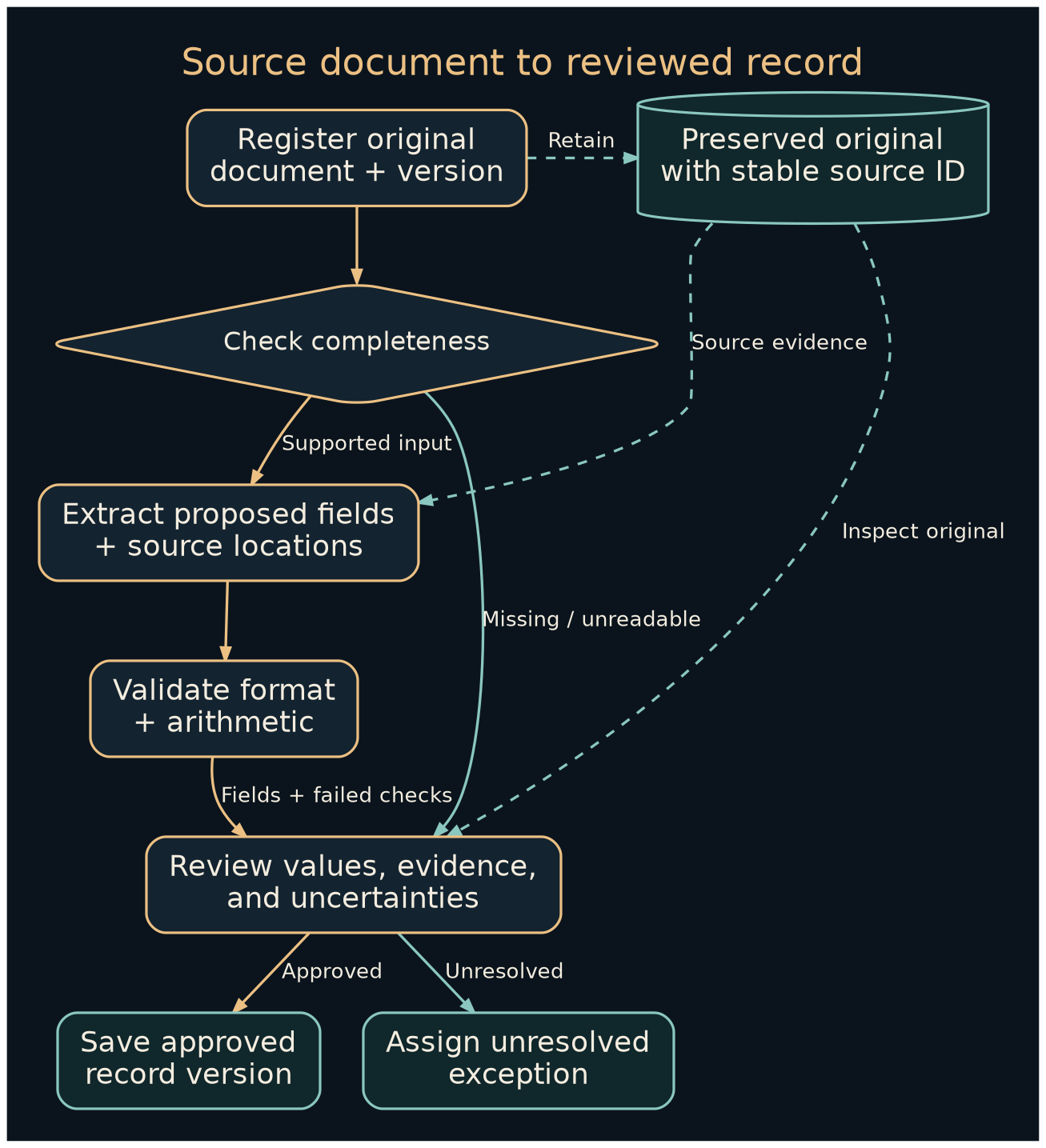
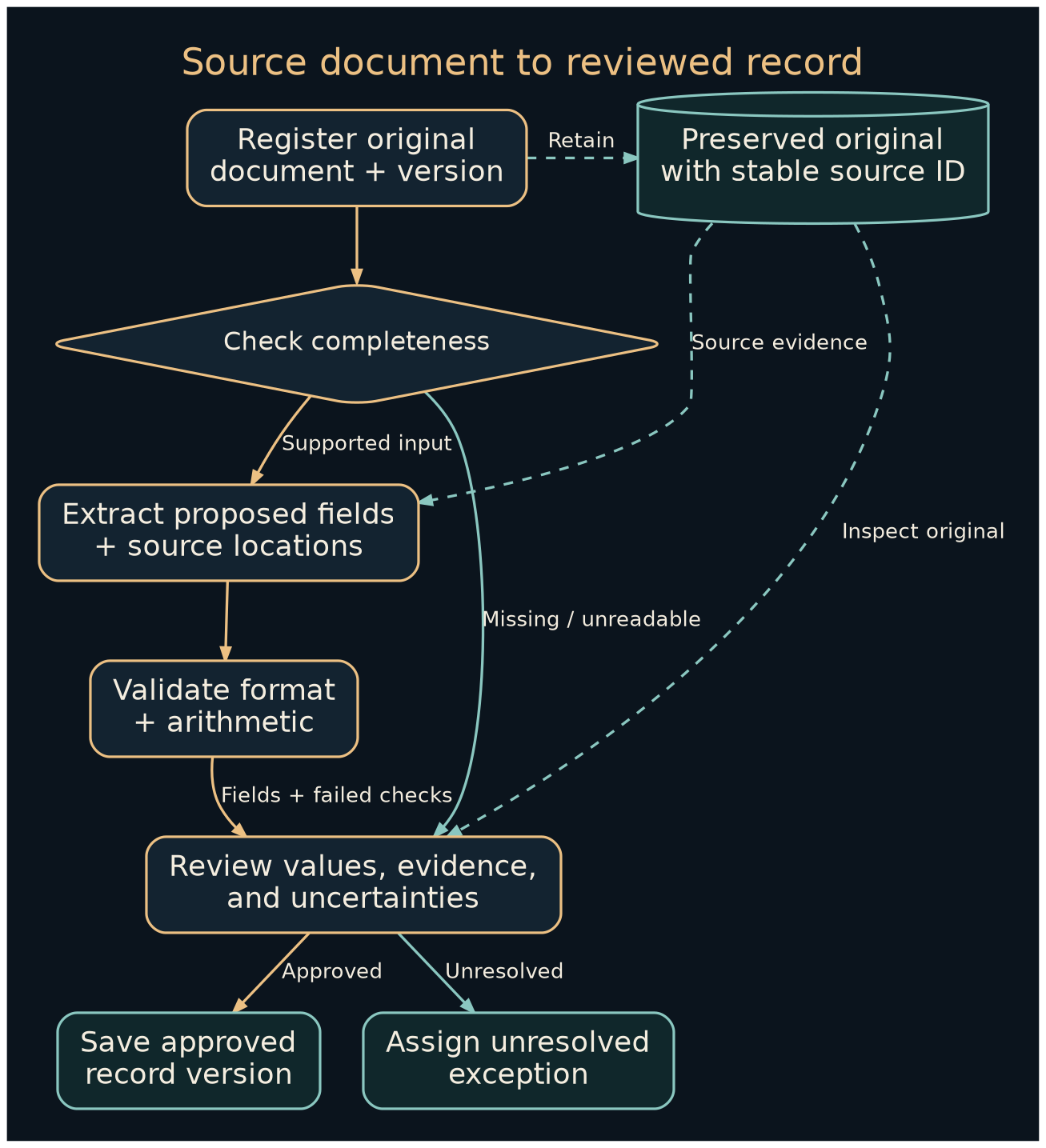
Build the extraction and checking sequence
- Register the source. Assign a document ID and retain the original file with appropriate access. Record a content hash to identify byte-for-byte duplicates.
- Check completeness and type. Verify that the sample is the supported invoice type and that expected pages are present. Route mixed document bundles or unreadable files to review.
- Extract proposed fields. Use a parser, OCR service, or model according to the input. Require source evidence and explicit unknowns.
- Validate structure and formats. Check the schema, date interpretation, amount formats, allowed values, and required business fields.
- Reconcile relationships. Compare quantities, unit prices, line totals, shipping, tax, and document totals using the applicable business rules.
- Check duplication and conflicts. Compare the document fingerprint and relevant business identifiers. Keep a possible duplicate visible for review.
- Present and record review. Show the original, proposed values, and failed checks. Save the approved record version and reviewer decision before a separate downstream process uses it.
A document hash alone cannot identify a rescanned copy of the same invoice. A vendor and invoice-number combination may help, but the actual uniqueness rule needs to match the accounting system and business process.
Run an arithmetic check locally
This standard-library Python snippet demonstrates the relationship in the fictional invoice:
from decimal import Decimal

subtotal = Decimal("18.00")
shipping = Decimal("5.00")
total = Decimal("23.00")

print("matches" if subtotal + shipping == total else "review_required")
Expected output: matches. Change the reported total to 28.00; the expected result is review_required. This verifies arithmetic on the supplied fields. A reviewer must still confirm that the fields themselves came from the correct document.
If the invoice includes tax, discounts, rounding adjustments, or different currencies, model those relationships explicitly. Do not force every document into the simple sample’s arithmetic.
Make uncertain extraction visible
A scan may confuse a decimal point, crop a page, or present several plausible dates. A model can also produce a syntactically valid but unsupported value. Keep unknowns and conflicts in the review record instead of filling them to satisfy a required field.
Microsoft’s Document Intelligence guidance describes service-generated confidence values and the need to consider extraction quality and human review. Such scores require evaluation on representative documents. A model writing “95% confident” in prose is not a validated operating threshold.
Test clear text, poor scans, missing pages, ambiguous dates, contradictory totals, duplicate files, different scans of the same invoice, and a document containing unrelated instructions. Measure field accuracy, missed unknowns, duplicate handling, review time, and false acceptance of problematic records.
Run the field-validation example
Open the complete runnable field lab in the ticket-triage guide’s source section. Expand Show complete Python source (offline, fictional data) and copy the entire code into a local file named build-ai-field-lab.txt. Run:
python build-ai-field-lab.txt documents
python build-ai-field-lab.txt self-test
The source includes fictional examples with matching totals, a duplicate, a wrong proposed amount, conflicting dates, and a missing currency. All results retain review_required.
The standalone source passed 22 self-tests on Python 3.12.14; the separate multi-file project passed 45 unit tests. These results verify the sample’s field checks and state handling. They do not measure OCR, model extraction quality, or an accounting integration.
Connect a real system only after review works
A first useful output can be a CSV or a review table. An integration can later create a draft accounting record through a narrowly scoped operation. Keep changes to vendor identity, bank details, and payment authorization in the established business process.
Use a stable operation key and destination-side uniqueness controls to avoid duplicate records after retries. If the destination response is uncertain, reconcile the attempted operation before repeating it.
Operating cost includes document processing, model calls, storage, connector operations, and human review. Group evaluation by document type and supplier layout so an average success rate does not hide a weak category.
The same pattern applies to forms, delivery notes, and other structured records, with different fields and checks. Continue with workflow design and AI governance to assign ownership and define the next action.